
WhatsApp staff scheduling · Cyprus & Greece

Close next week's schedule without chasing anyone.Close the schedule without chasing anyone.

Your staff answer in WhatsApp. Shifomat reminds anyone who hasn't and builds the week. You approve.

Start on WhatsApp

From €39 a month + VAT where applicable · first week free, as a gift (card at sign-up, first charge after 7 days; cancel before then and you pay nothing)

7days free, as a gift
€39a month, up to 15 employees + VAT where applicable
0apps to install
3languages: English, Greek, Hebrew

How long does it take you to close the weekly schedule, with all the messages and changes?

Count it all: the Sunday-night group chat, every “when can you work?”, every reminder, every redo. Hours every week? That's what Shifomat is for.

It doesn't matter what you run. If you've got people on shifts and you're the one chasing them, it's for you.

How it works

How a week goes

An example week

On your staff's phonesOn your phone

How it works

How a week goes

An example week

  1. Sunday, 21:00

    The bot asks everyone

    On the day and hour you choose, everyone on your staff gets a WhatsApp message with a button to send their availability.

  2. Wednesday

    It reminds whoever hasn't answered

    Anyone who hasn't answered gets a reminder, then a last call. None of it comes from you.

  3. Thursday

    You tap “Build schedule” and approve

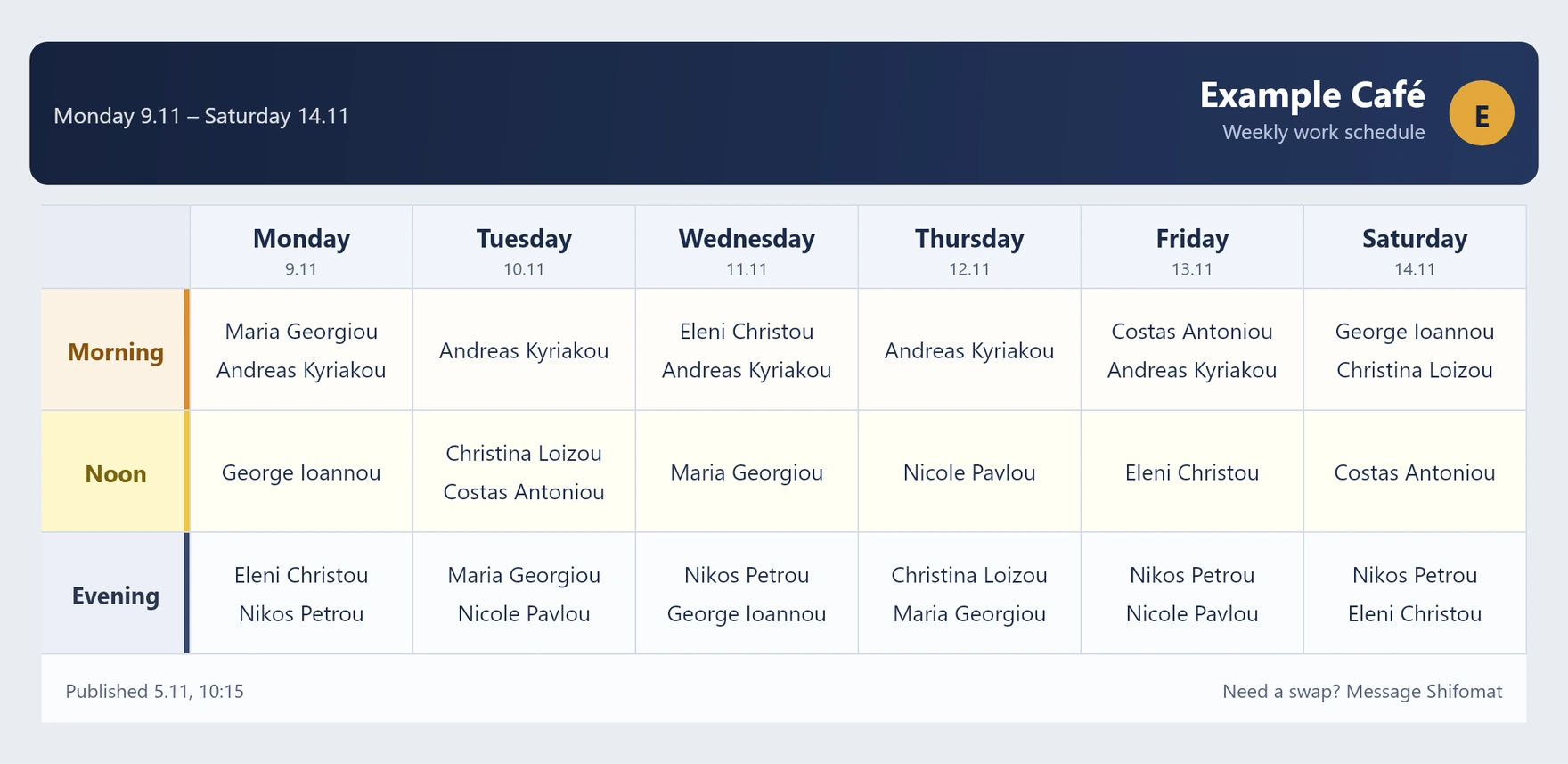
    Shifomat fills each shift from who said they're free. Change what you want and approve: the week goes out as one image, and each person gets their own shifts.

No AI. You set the rules, the bot fills the slots from your staff's availability, and nothing is sent until you approve.

Before the first week: set your shifts and how many people each one needs, then add your staff or send them a join code. You set it once, and Shifomat remembers.
The result

What your staff get

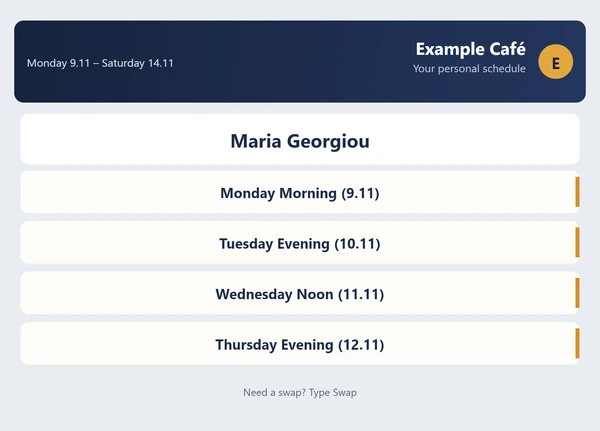
Everyone gets their own shifts in their own language: English, Greek or Hebrew. Nobody hunts for their name in the grid.

Tap the image to see it full size

Example. The business and the names are made up.

One team? Keep it as one. Kitchen and floor? Split it.

Departments are optional, and you can add them later.

Departments

Up to four, named your way. Set how many you need from each on a shift, say 2 kitchen and 3 floor, and Shifomat fills the shifts to those numbers.

A manager per department

Your chef schedules the kitchen, your head waiter the floor. You get a message when each one is done. Only you, or a main manager you add, can publish.

Event mode

Weddings, christenings, one-off nights? Open each as an event with a date, a time and how many you need. Shifomat asks who's free, you tap “Build schedule” and approve, and everyone gets a reminder the day before. Events or weekly shifts: you choose once, at setup.

Pricing

What it costs

Up to 15 employees€39a month + VAT where applicable
16–35 employees€89a month + VAT where applicable
More than 35 employees, hotels and chainsPrice on requestThe bot asks a few questions and sends you a quote. Questions: info@shifomat.com

Pay ahead and save: 10% on 3 months · 15% on 6 months · 20% on a year.

Your first week is free, as a gift. You add a card when you sign up, and the first charge comes only after 7 days. Cancel before then and you pay nothing.

Start on WhatsApp

This opens a WhatsApp chat, not a checkout.

  • Staff answer with buttons in WhatsApp
  • Reminders at the times you set: to anyone who hasn't answered, and the day before each shift
  • A schedule you check, change and approve before anything is sent
  • Status anytime: who's answered and who hasn't
  • Swap requests in the chat, with your approval
  • Departments, a manager for each, and event mode, if you need them
  • Works in English, Greek and Hebrew
  • A monthly summary of shifts, availability and swaps

Pay month by month and cancel anytime. You keep access until the end of the month you've paid for.

Payments are processed by Dodo Payments, our Merchant of Record. Dodo Payments charges your card, issues the invoice or receipt, and collects and remits any applicable VAT.

Terms & cancellation policy

Before you start

Is it AI? Does it decide anything about my staff?

No AI. You set the rules, the bot fills the slots from your staff's availability, and nothing is sent until you approve. Shifomat has no hiring, pay or performance features.

Do my staff need to install anything?

No. It all runs in the WhatsApp already on their phones, mostly with buttons. If they join with a code, they type their name once.

My staff speak different languages. Is that a problem?

No. Each person picks English, Greek or Hebrew, and Shifomat writes to them in that language. You pick yours. Anyone can switch by typing “language”.

What happens after the gift week?

You add a card when you sign up. After 7 days, your monthly price + VAT where applicable is charged (€39 up to 15 employees, €89 for 16–35), then once a month. Shifomat reminds you before that first charge. Cancel before then and you pay nothing. The gift week is once per business.

Can I pay ahead?

Yes, and you save: 10% on 3 months, 15% on 6 months, 20% on a year. You can still cancel anytime: the months you've used are counted at the full monthly price, and the rest goes back to the card you paid with within 14 business days.

How do I cancel?

Type “Cancel subscription” in your chat with Shifomat and it sends you the cancellation link. You cancel on that page, and nobody calls to talk you out of it.

We run events, not a fixed week. Does it work?

Yes. Pick event mode at setup. Then you can run several events at once, each with its own team. Decide first, though: a business can't switch between events and weekly shifts later.

The team behind Shifomat

We're the team behind Shifomat. We watched managers lose hours every week to the same work: collecting availability from dozens of group messages, chasing whoever hasn't answered, and redoing the grid after every last-minute change. We built Shifomat so the bot collects the availability and sends the reminders for you, in the WhatsApp everyone already has, with no new app. You set the rules and approve, and nothing is sent to your staff before you do.

Registered business · support right inside WhatsApp, or by email at info@shifomat.com

Leave the chasing to Shifomat.

Message Shifomat on WhatsApp. Ask your questions, get your sign-up link and set up your business, all in the same chat.

Start on WhatsApp

The first message is already typed. You just tap send.